


Google Business Profile optimisation is the work of setting up and maintaining your Google profile (formerly Google My Business) so that Google shows you in the map results. For many organisations, those are the most valuable searches there are: someone looking for a solicitor in their town, or a family searching for new homes nearby.
Most guides give you a flat list of 10 or 15 tips. In practice, three changes do most of the work: choosing the right primary category, using your exact name, and building a steady flow of reviews. Everything else helps, but less.
This guide puts the steps in order of impact and is written for UK organisations. Throughout, we show what each step looks like for two very different kinds of organisations we work with: a multi-office law firm and a master developer building a new community.
What Google Business Profile optimisation does
For most local searches, Google shows a map with three results above the normal listings. This is the local pack, and it’s where many people decide who to call or where to visit.
Your profile is also often the first impression someone gets. Before they reach your website, they’ve seen your reviews, your photos, your opening hours and how far away you are. A well-kept profile wins the click; a neglected one sends people elsewhere.
Two examples show how much rides on it:
- A law firm. Searches like “divorce solicitors [town]” almost always show a local pack, and “family law firm near me” alone gets around 1,100 searches a month in the UK. Someone choosing a solicitor is often anxious, and the profile is where they look for reasons to trust you.
- A master developer. Someone hearing about a new community on the edge of their town will often search its name on Google Maps before visiting. If the sales centre doesn’t have a well-kept profile, they may find a muddy site entrance, an out-of-date pin or nothing at all.
Optimisation does two jobs: it helps you appear for more searches, and it helps people choose you once they see you.
How Google ranks businesses on Maps
Google says it ranks local results on three things (Google):
- Relevance: how well your profile matches the search.
- Distance: how far you are from the person searching, or from the place they searched for.
- Prominence: how well known you are, including your reviews, links and how often you’re mentioned online.
You can’t change distance. A law firm’s Leeds office won’t rank for someone searching in Bradford, however good its profile is. That’s why organisations with several sites need a profile for each one. Everything else in this guide works on relevance and prominence.
To make the list easier to act on, we’ve grouped the steps into three tiers:
- Moves rankings: changes that affect which searches you appear for, and where.
- Helps people choose you: changes that turn a view into a call, a booking or a visit.
- Housekeeping: worth doing, but small on their own.
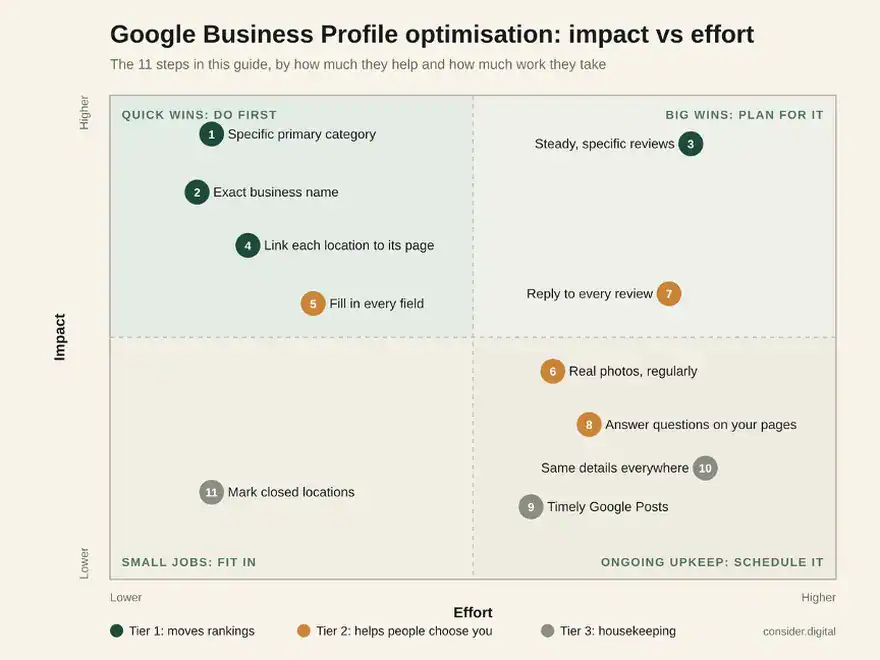
Step-by-step Google Business Profile optimisation, ranked by impact
Tier 1: changes that move rankings
1. Choose the most specific primary category
Your primary category has the biggest single effect on which searches you appear for. Pick the most specific one that describes what you do at that location, then add secondary categories only for things you really offer there.
- Law firm example: a family law practice should choose “Family law attorney” rather than the generic “Law firm”. Many of Google’s legal categories use US wording (“attorney”) even in the UK. Choose on how specific the category is, then use “solicitor” in your description, where you control the words.
- Master developer example: a sales and marketing centre for a new community is selling homes and land in one place, so “Real estate developer” fits better than “Construction company” or “Real estate agency”.
2. Use your exact name
Your profile name should match your real-world name: your signage, your website and your registered or trading name. Nothing more. Adding keywords or place names breaks Google’s guidelines and is one of the most common reasons for suspension. Competitors can flag it with “Suggest an edit”.
- Law firm example: “Smith & Co Solicitors”, not “Smith & Co Solicitors | Divorce Lawyers Leeds”. The name should also match the firm’s entry on the Solicitors Regulation Authority (SRA) register.
- Master developer example: use the name on the building, such as “Riverside Park Sales Centre”, not “Riverside Park New Homes | 3 & 4 Bed Houses Near York”.
If you have several locations, it’s fine to use the same brand name on each; Google tells them apart by address.
3. Get steady reviews that mention what you did
A steady flow of reviews matters more than your star average. Two new reviews a month, every month, does more than ten in one month followed by silence. Reviews that name a specific service also help you show up for searches about it. You can ask people to mention what you helped with, but don’t script their words.
Send the same request to everyone, not just the people you think are happy. Google’s policies don’t allow selectively asking for positive reviews.
- Law firm example: ask when a sale completes, a consent order is approved or a matter closes, never during a difficult stage of a case. A review like “they sorted my financial settlement quickly” helps the firm appear for financial settlement searches. Many clients won’t want their full name on a review about a divorce, so tell them initials are fine.
- Master developer example: ask buyers a few weeks after they move in, and residents after community events. Reviews that mention the park, the school or the bus into town tell future buyers what living there is like.
UK law: the fake reviews ban. Since 6 April 2025, the Digital Markets, Competition and Consumers Act has banned fake reviews and incentivised reviews that hide the incentive. It also bans misleading practices such as hiding negative reviews or only showing the good ones. The Competition and Markets Authority can fine businesses up to 10% of global turnover (CMS). Google goes further and bans incentivised reviews altogether. So no vouchers in a move-in pack in return for a review, and no prize draws.
How to get more Google reviews
- Send your review link (from your profile dashboard) by email straight after the moment that matters.
- Add it to email signatures and closing letters.
- Make one named person responsible for sending requests every week.
4. Link each location to its own page
Point each profile’s website link at the page for that location, not your homepage. This connects the profile, the page and the place in Google’s eyes. Add a UTM tag to the link so profile visits show separately in Google Analytics.
- Law firm example: it’s common to find a multi-office firm’s homepage ranking for its town searches while the office pages don’t rank at all. Linking each office’s profile to that office’s page, rather than the homepage, ties the office, the page and the town together.
- Master developer example: link the sales centre’s profile to the community’s own website or visitor page, not the group’s corporate homepage, which covers many sites.
Tier 2: changes that help people choose you
5. Fill in every field
A profile with blank sections looks neglected, and it gives Google less to match against searches. Work through every section: opening hours (plus bank holiday hours), services, attributes such as wheelchair access, a booking or contact link, and a description of up to 750 characters in plain English.
- Law firm example: add one service for each area of law, such as child arrangements, financial settlements and prenuptial agreements, each with a short description that matches the wording of the service page. Link the booking button to the free consultation or callback page.
- Master developer example: list what visitors can actually do at the sales centre: book a viewing, see the show homes, pick up a site plan. Set opening hours that match the sales team’s hours, and update them for bank holidays and launch weekends.
6. Upload real photos regularly
People want to see who they’ll be dealing with and where to go. Use real photos, not stock images, and add a few each month rather than 30 at once.
- Law firm example: photos of the solicitors and staff clients will meet, the outside of the building so people can find the door, and the meeting rooms. That does a lot to reassure someone nervous about a first appointment. No stock images of handshakes or gavels.
- Master developer example: real photos of the finished streets, the parks and the sales centre entrance, updated as each phase completes. Computer-generated images of homes not yet built can mislead if they look like photos, so keep them to your website, where you can label them.
7. Reply to every review
Reply to every review, good or bad. Thank people, keep it short, and take complaints offline.
- Law firm example: never confirm in a reply that the reviewer was a client, or mention anything about their matter, even if they have. That’s part of a solicitor’s duty of confidentiality, and personal details in a public reply can also raise UK GDPR issues. A safe reply: “Thank you for taking the time to leave a review. We’re glad you were happy with the service.”
- Master developer example: a review about snagging, roadworks or a delayed play area is often the first thing a future buyer reads. Acknowledge it, say what’s being done and when, and give a contact: “Thanks for raising this. The play area on [phase] is due to open in [month]. Please contact the community team on [number] if we can help in the meantime.”
8. Q&A has gone. Here’s where those answers go now
Pre-filling the Questions and Answers section used to be one of the best quick wins on a profile. Google removed Q&A in late 2025 and replaced it with an AI “Ask” feature in the Google Maps app.
The AI answers questions using your reviews, services, attributes and website. So the answers now need to live there, on your location pages and in your service descriptions.
- Law firm example: “Do you offer a free initial consultation?”, “Do you do legal aid?”, “Can I meet online?”
- Master developer example: “When will the school open?”, “Which housebuilders are building here?”, “Is there a bus into town?”
Tier 3: housekeeping
9. Post when you have something timely
Google Posts are short updates that appear on your profile. They won’t transform your rankings, but they show the profile is looked after. Tie them to real moments in the UK calendar or in your own year.
- Law firm example: a family law firm posting its guide to sharing Christmas with the children in December, or a note in early January, when divorce enquiries traditionally rise.
- Master developer example: a new phase launching, the school opening, a summer fun day in the park, or a planning milestone.
10. Keep your details the same everywhere
Your name, address and phone number should match exactly across your website and the directories people use. Inconsistent details make Google less confident about which information is right. The usual UK set includes Yell, Bing Places, Apple Business Connect and Trustpilot.
- Law firm example: also the SRA register, the Law Society’s Find a Solicitor and Review Solicitors.
- Master developer example: also the development’s pages on your housebuilders’ websites, and their new homes listings on Rightmove and Zoopla, so buyers don’t find three different addresses for the same sales centre.
11. Mark closed locations as closed
If a location closes, mark its profile as permanently closed so people don’t turn up at an empty building. Don’t simply delete it, or you can lose its history and reviews.
- Law firm example: when an office closes or merges into another, close its profile and update the website link on the remaining office.
- Master developer example: sales centres often move as a site builds out. If the sales centre moves to a new phase, update the address on the existing profile rather than creating a new one, and keep the change to a single edit (see suspensions below).
Running profiles for several locations
If you have more than one site, each one that serves people in person should have its own profile. Google’s rule is that a business must make in-person contact with customers during its stated hours (Google). A few rules follow from that:
- Staffed during your listed hours. Virtual offices, mail-forwarding addresses and rooms hired by the hour don’t qualify.
- One profile per address. Two profiles for the same organisation at the same address are a common suspension trigger.
- Give at least two people owner access, so you don’t lose control of a profile when someone leaves.
Law firm example: each staffed office gets its own profile. Individual solicitors can also have their own practitioner profiles. That can help a well-known partner, but it splits reviews away from the office profile, so decide deliberately.
Master developer example: this is where new communities most often go wrong. Google’s guidelines say model homes and properties for sale aren’t eligible for a profile, but sales or leasing offices are. So:
- The staffed sales or visitor centre gets a profile.
- Show homes don’t, even though they’re open to visitors.
- Community facilities such as the school, health centre or leisure club should be claimed by the organisations that run them, not by the developer. Make sure each operator knows it needs to.
Google Business Profile suspended? What triggers it and how to get back
“Google business profile suspended” is searched around 700 times a month in the UK, more than any other question in this guide. Suspensions usually come from a handful of causes:
- Keywords or place names added to the business name.
- An address that doesn’t meet the guidelines, such as a virtual office.
- Duplicate profiles at the same address.
- A burst of edits in a short time, such as changing name, category, and address together.
- A sudden burst of reviews.
Master developer example: new communities are especially exposed. New roads and postcodes can take months to appear on Google Maps, so the address may not match what Google expects. If that happens, enter the nearest recognised address and drag the map pin to the exact entrance. Avoid repeated address edits as the sales centre moves; make one clean change.
If your profile is suspended, fix the cause first, then appeal through Google’s Business Profile appeals tool with evidence ready:
- A photo of your signage at the address.
- A recent utility or business rates bill in the organisation’s name.
- Your Companies House record, and any regulator registration (for a law firm, the SRA number).
- A link to your website showing the same name, address and phone number.
Google usually replies by email. If the appeal is turned down, check you’ve fixed every possible cause before trying again.
How to measure Google Business Profile results
You don’t need expensive tools to see whether your changes are working:
- The Performance report in your profile shows calls, messages, bookings, direction requests and website clicks. Check it monthly and compare with the same month last year if your enquiries are seasonal.
- A UTM-tagged website link lets Google Analytics show profile visits, and the enquiries they lead to, separately from other Google traffic.
- A monthly rank grid for two or three main searches per location shows whether you’re appearing for more people, further away.
What to watch depends on what you want people to do:
- Law firm example: calls and consultation bookings per office, and rankings for searches like “divorce solicitors [town]”.
- Master developer example: direction requests and viewing bookings for the sales centre, and rankings for the community’s name and searches like “new homes [town]”.
Give changes time. Fixes to your category and name can show within weeks; gains from reviews build over months.
Want help optimising your Google Business Profile?
The profile itself is free. Getting it right, and keeping it right, takes time. That’s where Consider Digital can help.
We work with organisations that have more at stake in local search than most, including multi-office law firms and master developers building new communities. We can:
- Audit every listing you have and tell you which changes will move your rankings first.
- Fix the foundations: categories, names, location links and every missing field.
- Set up a review process your team will actually use, within UK review law and your professional rules.
- Manage several locations, from new offices to sales centres that move as a site builds out.
- Sort out suspensions and get your profile back.
- Report monthly on calls, enquiries and rank grids, so you can see what’s working.
Book a free call to run through your Google Business Profile. We’ll review your listings and send you the three changes most likely to make a difference.
FAQs
What does Google Business Profile optimisation do?
It helps you appear in the map results for local searches, and gives people what they need to choose you: reviews, photos, opening hours and an easy way to call, book or get directions.
Is Google Business Profile free?
Yes. There’s no charge to create, verify or update a profile, and you can’t pay for a higher place in the map results.
How long does Google Business Profile optimisation take to work?
Fixes to your category and name can show within a few weeks. Gains from reviews build over several months. Track progress with the Performance report and a monthly rank grid.
Why has my Google Business Profile been suspended?
Usually because of keywords in the name, an address that breaks Google’s guidelines (such as a virtual office), duplicate profiles, or a burst of edits. See the suspensions section above for how to appeal.
Why is my Google Business Profile not showing up?
It may not be verified, it may be suspended, the searcher may be too far away, or your primary category may not match the search. Check each in turn.
Can a show home have its own Google Business Profile?
No. Google’s guidelines don’t allow profiles for model homes or properties for sale. A staffed sales or visitor centre can have one.
Can solicitors reply to reviews without breaching confidentiality?
Yes, as long as the reply never confirms the reviewer was a client and never mentions their matter. Keep it short and move any complaint offline.
